The most expensive thing a thief takes abroad usually isn't your phone. It's the four digits you typed into it an hour earlier, while they watched. Noovo, the social trip-planning app for friends, is built so the right people know where you are on a trip. This is the other half of that: making sure a stolen phone stays a stolen phone, and doesn't become a stolen bank account, a locked-out Apple ID, and a ruined week.
My phone was just stolen. What do I do right now?
A friend of mine learned this in Ibiza. Her iPhone was lifted in a crowded bar, which is annoying but survivable. What made it a nightmare was what came before the theft. The people who took it had been near her earlier in the night and watched her unlock the phone. They didn't just have her device. They had her passcode. Within an hour they were inside her banking apps, they had changed her Apple ID password, and they had locked her out of her own account so she couldn't even track the phone or wipe it. By morning her cards were maxed and Apple support couldn't help her fast enough to matter.
Here's the part almost nobody plans for: the theft started before the phone went missing. The passcode is the whole game, and it gets stolen by looking, not by hacking.
Why the passcode is worth more than the phone
A modern phone is a locked vault. Face ID and a strong lock screen make the hardware close to useless to a stranger. So professional thieves stopped attacking the vault and started collecting the key. They watch you type your passcode at a bar, on the metro, in a festival crowd, sometimes filming it, then they lift the phone a few minutes later. Now they have an unlocked device and the one code that unlocks everything behind it.
With the passcode alone, a thief can do far more than empty your photos. As CNN reported in 2023, thieves who have both your iPhone and its passcode can change your Apple ID password, turn off Find My so you can't track or erase the device, and even set a recovery key that permanently locks you out of your own Apple account. The reporting that broke this open, the Wall Street Journal's investigation titled A Basic iPhone Feature Helps Criminals Steal Your Entire Digital Life (summarized here), documented victims who lost access to a lifetime of photos and had thousands drained from bank accounts, all from one watched passcode.
The fix is not to travel less. It's fifteen minutes of setup before you leave, and knowing the exact order to move in if it happens.
The 15-minute setup before you leave home
Do this on the couch the night before, not in the airport. Every one of these has to be switched on before a theft. None of them can be turned on after.
On iPhone:
- Turn on Stolen Device Protection. This is the single most important setting, and it is off by default on older setups. Introduced in iOS 17.3, it means that when your phone is away from familiar places like home or work, the sensitive actions a thief needs, changing your Apple ID password, turning off Find My, viewing your saved passwords, require Face ID or Touch ID with no passcode fallback. The most dangerous changes also trigger a Security Delay: one hour, then a second face scan. That delay is the window that saves your account. Turn it on at Settings, Face ID and Passcode, Stolen Device Protection. Apple's guide is here.
- Switch to an alphanumeric passcode. A six-digit code is a keypad a thief can memorize in one glance. Add even one letter and the lock screen shows a full keyboard, which is far harder to read over a shoulder and far harder to brute force. Settings, Face ID and Passcode, Change Passcode, Passcode Options, Custom Alphanumeric Code.
- Confirm Find My is on, and know how to reach it without your phone. Bookmark iCloud.com on a travel companion's device, or make sure they can find you in their Find My. If your only path to Lost Mode is the phone that just got stolen, you have no path.
On Android:
Google shipped its own version of all of this in 2025. Per Google's security blog, turn on Theft Detection Lock, which uses motion to detect a snatch and locks the screen instantly, Offline Device Lock, which locks the phone if it's yanked off the network, and Identity Check, which puts biometrics in front of sensitive account changes when you're away from trusted places. You can remote-lock a lost Android from any browser at android.com/lock.
Guard the passcode like it's your PIN, because it is
Setup handles the phone. Only you can handle the passcode, and this is the habit the Ibiza story turns on.
- Use Face ID or a fingerprint in public, not the code. Every public passcode entry is a chance for someone to read it. Let biometrics do the unlocking where people can see your screen.
- When you must type it, hide it. Cup your free hand over the keypad the way you would at an ATM. Assume someone is looking, because in a nightlife crowd in a theft hotspot, someone often is.
- Know where the hotspots are. Spain's party islands and big cities sit near the top of every European theft list. Recent 2025 analysis named Ibiza, Barcelona, and the Costa Brava as the country's riskiest hotspots, driven by nightlife crowds and pickpocketing. Barcelona alone logged over 100,000 pickpocketing incidents in a single year. Crowds, alcohol, and a phone out for photos are the exact conditions these crews work in.
What to do right now
If it happens, speed beats everything. The thief's advantage is the minutes before you react, so react in a fixed order and don't improvise. This is the sequence, and it's worth saving somewhere you can reach without your phone.
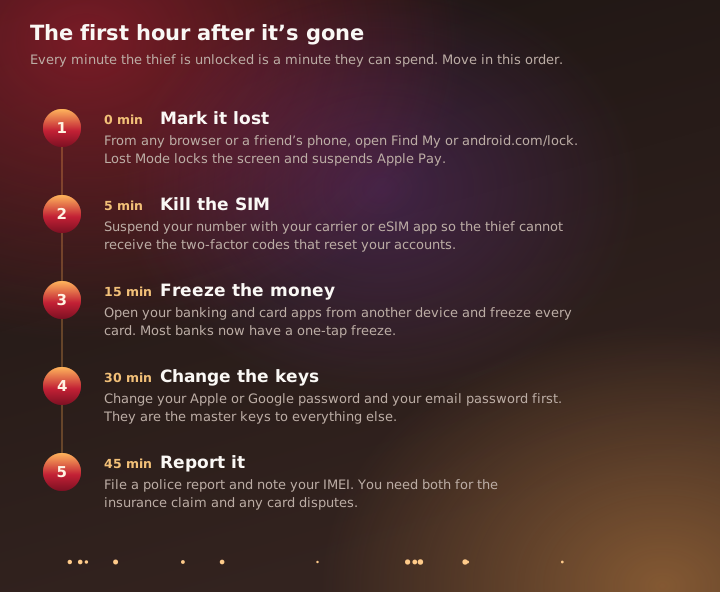
- Mark it lost, first. From any browser or a borrowed phone, open Find My at iCloud.com or android.com/lock and put the device in Lost Mode. This locks the screen and suspends Apple Pay immediately, even if the thief still has it unlocked in their hand.
- Kill the SIM. Call or message your carrier, or open your eSIM app, and suspend the number. Your phone number is how password resets and two-factor codes arrive. Cut it off and you close the thief's easiest path back into your accounts.
- Freeze the money. From another device, open every banking and card app and freeze the cards. Most banks have a one-tap freeze now. Do this before you do anything slow like calling.
- Change the master keys. Change your Apple ID or Google password and your email password first, because those unlock everything else. Then anything you know you've reused.
- Report it. File a police report and note your IMEI number. You'll need both for the insurance claim and any fraudulent-charge disputes, and a report can flag the device on carrier databases.
The reason to memorize the order is that a stolen phone triggers panic, and panic improvises. The people who come out of this with a bad day instead of a bad month are the ones who marked it lost and froze their cards before they let themselves feel it.
The quiet part: someone should know where you are
There's a reason the Ibiza story got worse after the phone was gone. She was in a place where she didn't have her usual people around her, didn't have a second device, and didn't have anyone nearby who knew her plans well enough to help her move fast. Locked out of her own phone, she was also locked out of her support system.
This is the slice Noovo is built for. Travel with the people who should know you're away actually knowing, and knowing where. It's why a shared itinerary matters more than it seems: not so friends can watch a feed, but so that on the worst night of the trip there's someone who has your dates, your location, and a working phone. Noovo's visibility settings let you share a trip with a specific crew and nobody else, so the people who'd help in a crisis are looped in without broadcasting to strangers that your home is empty. The rest of the travel-safety picture, the paperwork, the scams, the habits worth keeping, is in our guide to travelling safer without travelling smaller.
A phone is replaceable. Fifteen minutes before you go, and a clear head in the first hour, is what keeps the theft from taking anything you can't buy again.
Sources
- CNN, How to protect yourself from iPhone thieves locking you out of your own device (2023)
- MacRumors, on the Wall Street Journal report: thieves spying on iPhone passcodes to steal your entire digital life (2023)
- Apple Support, About Stolen Device Protection for iPhone
- Google Security Blog, Android theft protection with Identity Check and expanded features (2025)
- Travel And Tour World, Spain's riskiest and safest tourist destinations (2025)